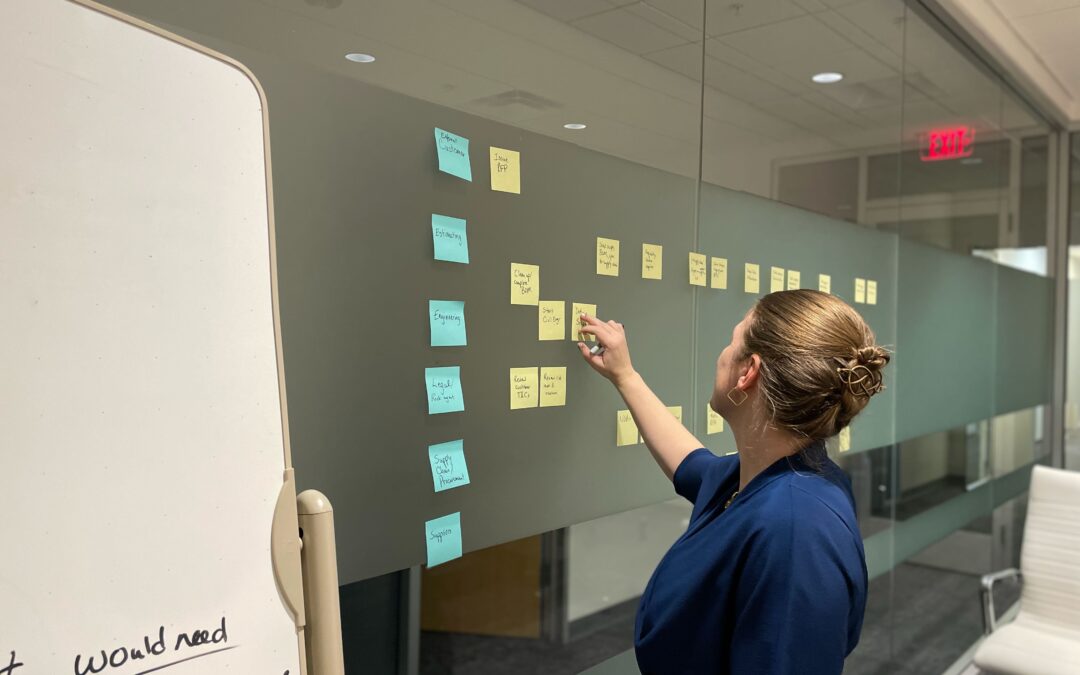
In our AI age, people give me the side-eye when I pull out my Sharpie and Post-its. They’re trying to be polite about it, but I know they’re wondering: “This gal makes spreadsheets for her vacations. Why pull out the Post-its?” Everyone expects me to pop open the laptop and open Visio when it’s time to build a process map, but I never do. To tell you a secret, I kind of hate Visio. A good process mapping exercise flows, and entering things into Visio always feels like slogging through mud (even with a great Visio operator, which I am not). So today let’s talk about how I approach process mapping: the major steps, how it adds value, and why I go old school when I’m running a process map exercise.
Major Process Map Steps
This last week I had the privilege of running a process map exercise for a long-time colleague, who just started a new role leading a procurement team where the longest tenure was two years. This is his third time through mapping processes, but he commented that there are still things every team comes up with that surprise him. Even though he’s been through the process multiple times, he still calls me in to facilitate because he wants an outside perspective. So here’s the major steps I use with his teams and all the other clients I do this work for:
- Map the big picture. If I start first with diving into the process map, we spend 30-60 minutes contemplating where the process even starts. Does a PO process start when a Project Manager submits a requisition? When they first identify a need? When the buyer opens the ERP system to cut a PO? It varies at every business for every process. So I like to start with a SIPOC, which stands for Suppliers, Inputs, Process, Outputs, Customers. The SIPOC includes a mini process map, just 5-7 steps long, but it’s incredibly useful to decide where our larger process map will start and end. It also gets the team thinking about who their customers are, and which inputs they need to feed a solid process.
- Map the current state. This is where most of the work goes in process mapping, and the goal is a complete and unvarnished picture of the process as it stands today. The most common hangup at this point is the “what about”-isms. Everyone wants to talk about the exceptions that derail the process. These are important, but the focus should be on mapping the “80% path.” If an exception happens roughly 80% of the time, include it. If not, mark or note the exception but don’t let it derail the process map.
- Map the future state. I don’t always make it to this stage, and sometimes the team isn’t ready for it. If we’re doing two sessions spaced a week or two apart, I like to come back and map the future state in the second session (this works super well with a busy team who finds it easier to dedicate two half-days instead of a whole day). Either way, this is the process map as the team thinks it can be when all the settings are correct, obstacles are removed, and documentation/inputs are clean. In my experience, this removes 20-30% of the process steps.
- Document action items. If you’ve been diligent, you’ve been keeping a running list of action items or questions that will need an action item to answer (i.e. can we make the default value in this tax field “1” so I don’t have to type 1 every time?). The action list essentially answers: how do we get from current state to future state? Failing to finish up with assigning actions to specific people in the room is a recipe for losing the value gained in process mapping.
Running a good process mapping exercise, especially with team members in the room, takes a lot of resources. Whether run as a single day or two half-days (I can get two solid processes mapped in a one-business-day session), it can be hard to determine the value of the exercise. So let’s talk about value.
How Process Mapping Adds Value
The obvious value of a process mapping exercise is the actual process map. Yet the less tangible benefits often surprise teams and are just as valuable. Almost every process mapping exercise also has the following benefits:
-
- Everyone learns something. This sounds like, “Oh, I didn’t know I could do it that way.” If the team leader also decides to be in the room, the team learns more about that leader’s philosophy, what they will or won’t tolerate, and what they prioritize. This is especially true with new teams or teams with new leaders.
- Understanding. People really understand one another better after spending a day in a room together. This is not some “team building exercise” work, it’s simply being together, working on a common goal, and getting to know one another better. I’ve seen a team be more cohesive after mapping a process together, even if they’ve been a team for some time. Bonus points if the process mapping team is cross-functional, because suddenly each department sees how their actions affect other departments downstream (or upstream!) in the process.
- No forbidden topics. There’s something about a process mapping exercise that lets people actually talk about all pieces of the process. Team members get an opportunity to ask, “why do we actually do it this way?” and challenge inefficient norms.
- Outside perspective. Having an outside facilitator, even one from another part of the company, offers an outside perspective and can call out things that are unusual for the industry. For example, the company I process-mapped last week signs and countersigns every purchase order using Adobe Sign. Purchase orders are already a contract, so this only debatably reduces risk and adds a lot of effort. Ultimately it’s the legal team’s decision on how to run PO signatures, but many team members were new to procurement and didn’t realize this wasn’t “normal.”
Why Post-its?
Now we get down to the really important question in all of this: Why Post-it notes on a wall? Why not map it live in Visio or a similar tool? I know, I’m a person who loves processes and spreadsheets and organization. But I’ve never climbed the learning curve associated with Visio, at most companies it’s shockingly hard to get a license, and everything in Visio feels so permanent. Once it’s in there, no one wants to figure out how to go in and adjust it when something changes, so it’s out of date the minute the Visio workflow is made. That, along with a few other reasons, is why I use Post-its:
- If something is too polished, people won’t correct it. When you put something into Visio, it looks pretty . . . and a bit intimidating. There’s a false expertise assigned to the facilitator, and no one in the room wants to tell them a step is in the wrong spot. If a Post-it is wrong, you just throw it out and make a new one. Or restick it in the right place in the process. It’s easy and non-intimidating.
- Old-school matches the processes. Often processes have been the way they are for a long time. They feel outdated. Everyone in the room knows there’s something better, but they don’t have better for a variety of reasons. Using an old school mapping process gives the room permission to be old school. It’s subtle and mostly unconscious, but when the process dates to the 1990s, it can feel incongruous to use technology from the last few years to map it.
- Easy to read. While this does require the facilitator to have decent handwriting, usually Sharpie markers on Post-its are pretty easy to read. It’s high contrast, you can still use color coding without having to use multiple colors of markers, and it’s legible even for those with various forms of colorblindness. Having to write on a 3” square Post-it also forces brevity in the group because there simply isn’t the real estate available to be wordy. The biggest issue I deal with for legibility is if someone in attendance has called in and is not in the room, in which case documentation on the wall is hard for them to read (even with good conference room cameras).
- Inexpensive. Software licenses are expensive. Post-it notes (even the brand-name, see side note below!) are cheap, and don’t require cybersecurity review.
I talked to my brother who also uses Post-its for facilitating brainstorming sessions, and he had two reasons to add (not as specific to process mapping):
- Cohesive. You can give everyone a stack of Post-its of the same color and have them brainstorm their ideas. Once they take their own notes and put them on the wall, there’s a sense of accomplishment and their individual ideas blend into everyone’s ideas. This helps people negotiate based on the merits of an idea instead of who originated it.
- Tactile. There’s a childlike joy in playing with colored paper and Sharpies that unlocks something in people. People tended to be more creative in their early school years, and so playing with colored paper brings that creativity back. Post-its also suit tactile learners very well, who learn something well when they write it, feel it, and get to touch it.
Important side note if you’ve gotten this far. You have to buy the 3M Post-it notes. The Staples or other off-brand sticky notes don’t stick, even to large sheets of paper. I don’t know why this is, but it is and has been for years. Off-brand sticky notes are fine for daily tasks. Don’t use them for process mapping.
If you’d like to talk about process mapping in procurement or other areas of your business, let’s chat. If you’d like to get these articles weekly straight to your inbox and never miss one, sign up for my newsletter.
My book, Transform Procurement: The Value of E-auctions is available in ebook, paperback and even hardcover format: https://www.amazon.com/dp/B0F79T6F25
My chapter in the powerful anthology Femme Led: Hard-Learned Lessons from Women in Leadership is now available in ebook and paperback format: https://a.co/d/0bOzma8F